From cloud to AI in a Box: the recipe behind the 88%.
The full technical follow-up to a LinkedIn post 68,000 people read: architecture, stack, versions, costs, trade-offs, and the ROI calculator.
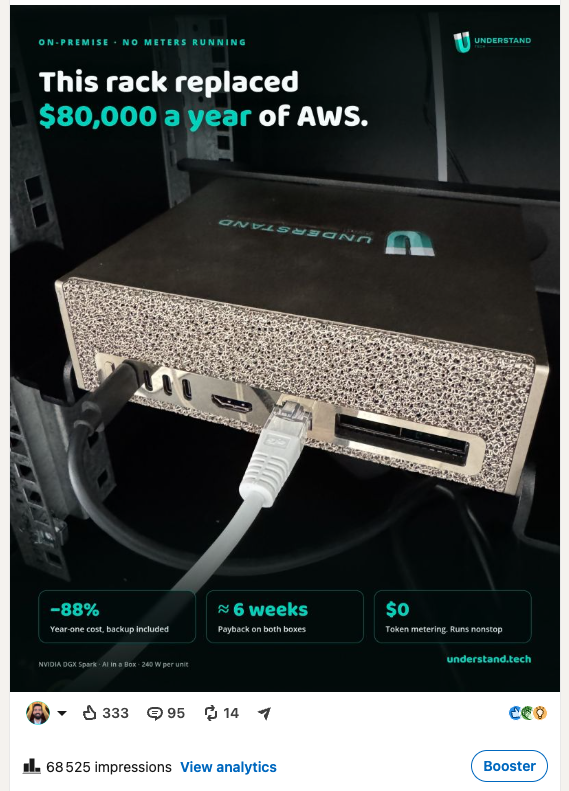
Earlier this week I posted on LinkedIn that we cut our AI cost by 88% by moving our LLM workload from AWS to two DGX Spark units on our office rack. As of today (two days later) 68,000 people read it. The questions in the comments were better than the post. So here are the real answers: the architecture, the stack, the versions, the costs line by line, the trade-offs, and the calculator several of you asked for.
What was actually running on AWS
Let me kill a misunderstanding first, because half the skeptical comments started there. We were not renting two big instances to serve one small model.
Two g6e.8xlarge instances, one for staging, one for production, in eu-central-1. Each ran the full inference stack of our SaaS: vLLM 0.11.1 in the NVIDIA NGC container serving gpt-oss-20b, plus everything around it. Embeddings with Nomic Embed v1.5 through llama.cpp. Reranking with Qwen3-Reranker 0.6B. BM25 and a FAISS vector index. The workers parsing documents. That is the Understand AI container: the LLM tier serving everyone on our platform, RAG, agentic flows, our apps. Our own teams daily, plus every prospect who uses our cloud to evaluate the AI in a Box stack, the models, the RAG, the agents, before committing to the box itself. The SaaS is the try-before-you-buy environment for the appliance. Around 20 concurrent sessions at normal peak, load tested to 25.
That is why the instances were big. A pipeline session is not a chat stream. Parsing and embedding eat CPU and RAM next to the GPU. The bill for those two machines, as billed by AWS, averaged about $6,600 a month. Close to $80,000 a year. Busy or idle.
For a deeper tour of that AWS setup, there is a walkthrough AWS published with us over a year ago: Build custom and secure AI assistants on AWS with Understand Tech. Some details have moved since, the models are newer and the serving layer evolved, but the overall architecture is the same one described there.
The whole migration was one target-group change
The design rule we set on day one: the application must not know where the model lives.
All inference calls go through one internal Application Load Balancer. ALB target groups accept IP-type targets, and AWS allows an IP outside the VPC CIDR when it is registered with availability zone = all. So we pointed the target group at the DGX's LAN address in our office. Same hostname, same port, same health checks. From the application's perspective, nothing happened.
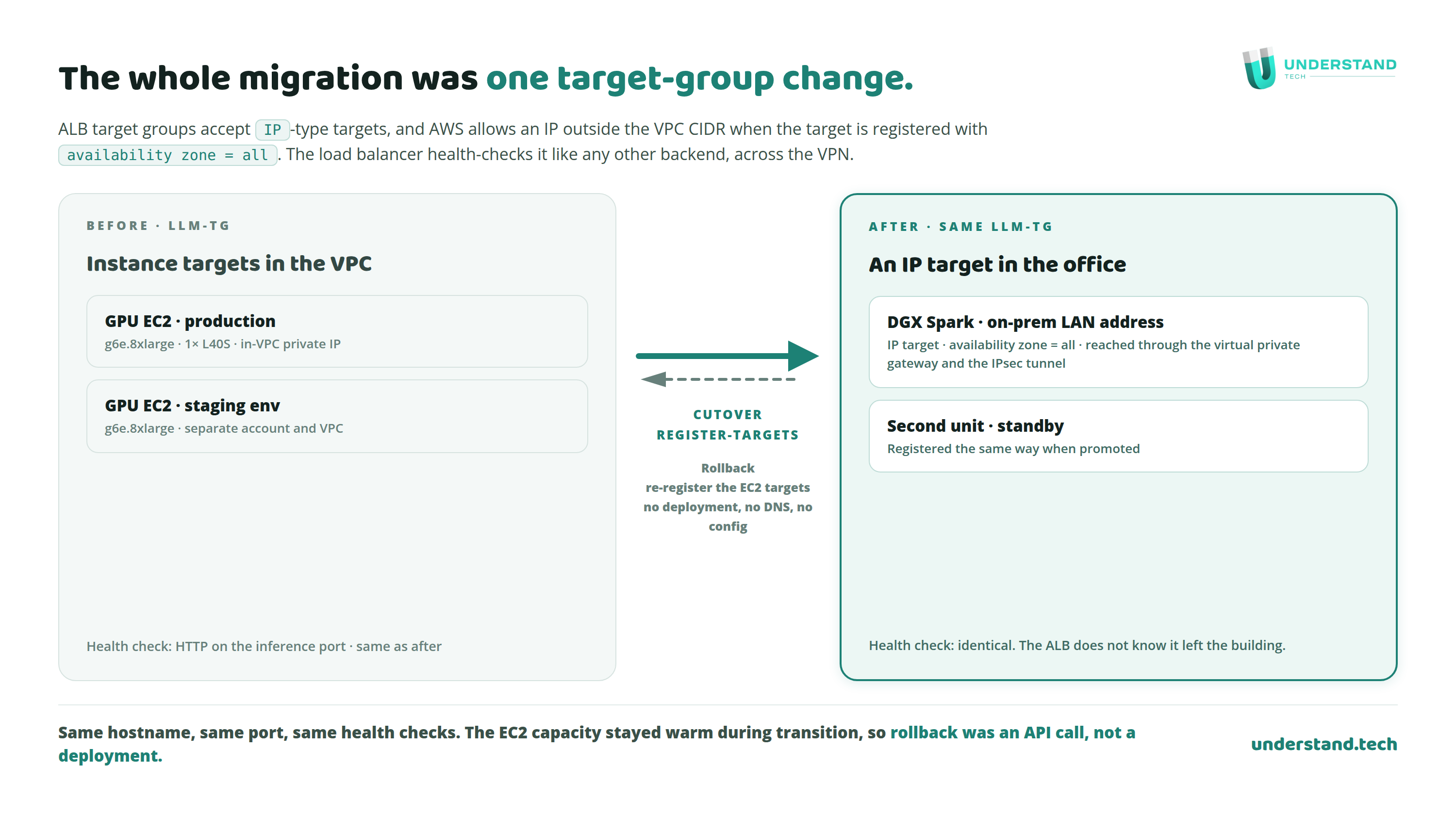
This also gave us a free rollback. The EC2 capacity stayed warm during the transition. Shifting traffic back was an API call, not a deployment. When you move production inference from a datacenter to an office, that rollback is worth more than confidence.
The tunnel, including the annoying French part
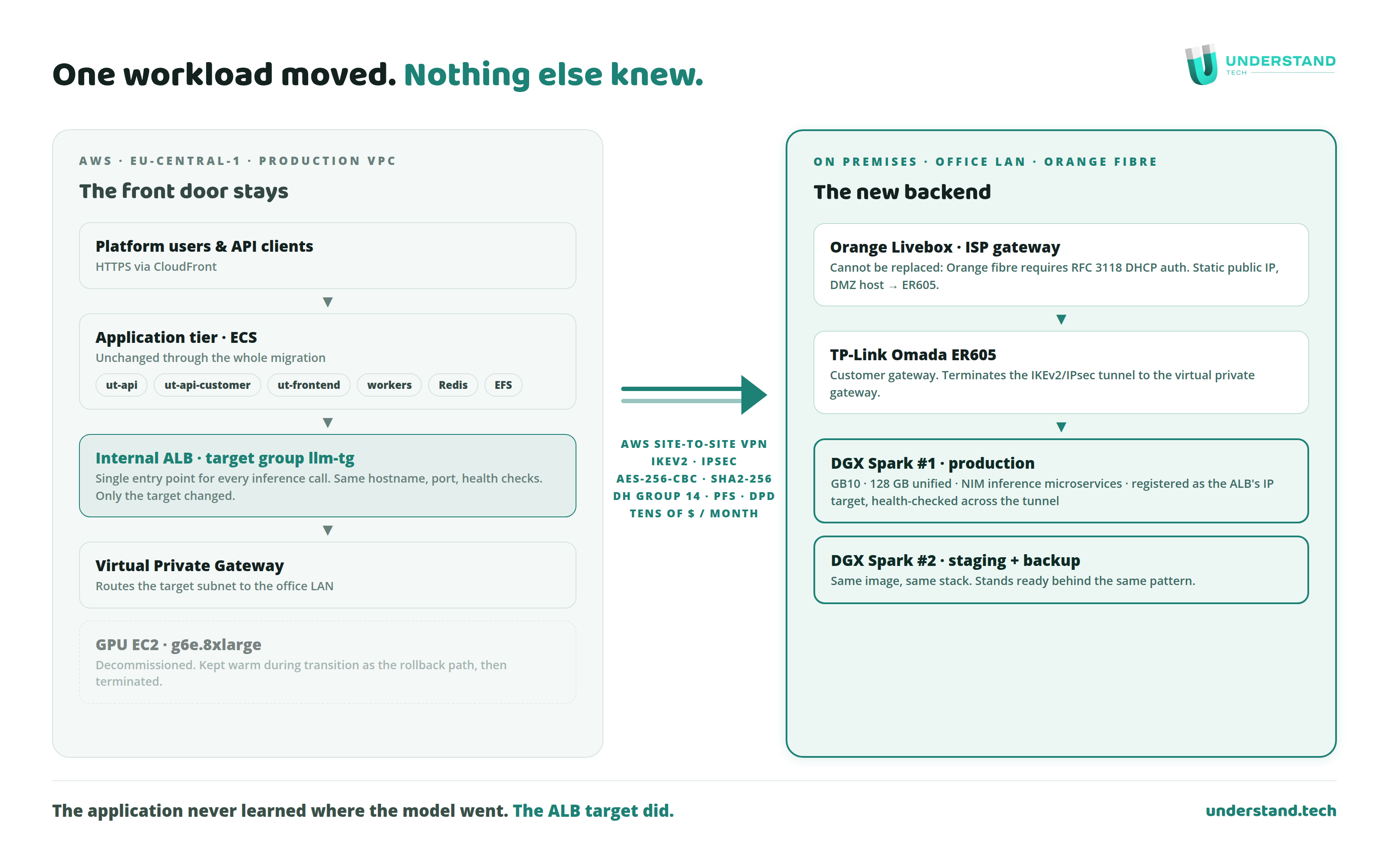
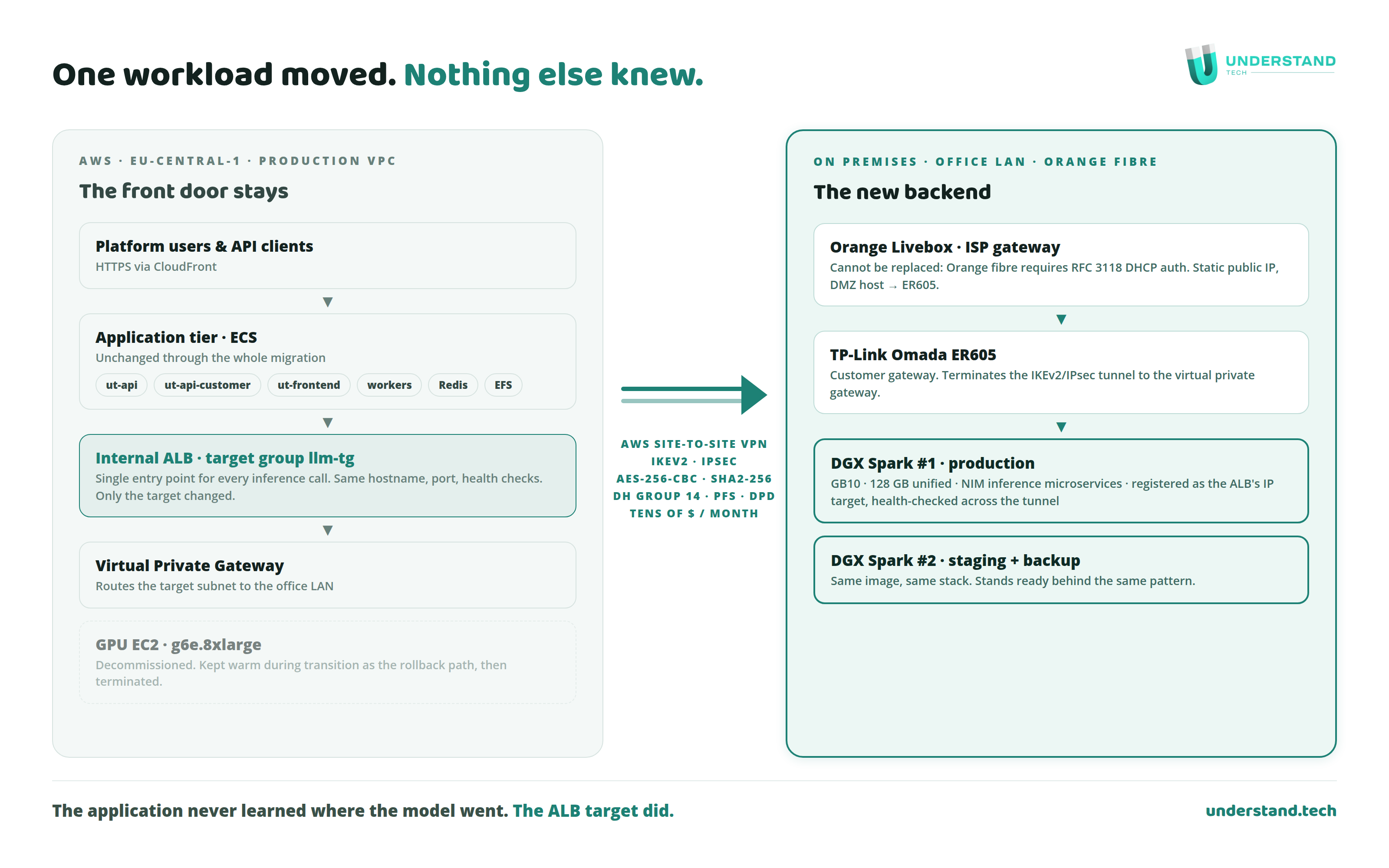
The boxes sit behind Orange fibre. You cannot replace the Orange Livebox as the gateway: their fibre handoff requires RFC 3118 DHCP authentication that third-party routers cannot produce. If you are in France, you know.
So: Livebox with a static public IP, DMZ host pointed at a TP-Link Omada ER605. The ER605 terminates the AWS Site-to-Site VPN as customer gateway. IKEv2, IPsec, AES-256-CBC, SHA2-256, DH group 14, PFS, DPD. The DGX sits on the router's LAN, reachable from the VPC through the virtual private gateway. The ALB health-checks it across the tunnel like any other backend.
The router costs under $100. The VPN costs tens of dollars a month. We validated everything in the staging VPC before production ever touched it.
What runs on the boxes today
Several of you asked for the exact stack. Here it is, versions included.
At cutover, the boxes ran the same engine as the cloud: vLLM serving gpt-oss-20b, containers rebuilt for arm64 because the Spark's Grace CPU is Arm. Nothing assumed, everything verified. Running the same engine and the same model on both sides is what made the two-month comparison honest.
Since then we moved the inference layer to NVIDIA NIM microservices, NIM 2.x. One optimized container per model, OpenAI-compatible API, vLLM engine under the hood, health-gated startup. Today the boxes serve Nemotron 3.5 Lightning 30B A3B as the main text model or Qwen3.8 27B, and Qwen3 VL 4B for vision. Orchestration is LangChain 1.3.12 with LangGraph 1.2.8, deliberately model-agnostic: we swapped the entire serving layer without touching the API. The RAG pipeline is unchanged from the cloud days: Nomic Embed v1.5, Qwen3-Reranker 0.6B, BM25 plus FAISS.
Everything is Docker Compose, managed through Portainer, with real-time monitoring, log archival and local backups. None of this is secret: the installation guide walks through the whole deployment step by step, and the compose setup lives in the ai-in-a-box repository on GitHub. One box carries production. The second runs staging and stands ready.
Which produces a detail I love: prospects evaluating AI in a Box are now literally served by AI in a Box. The demo environment is the product. When someone asks how the appliance performs under load, the honest answer is that they have been testing on it all along.
The model rule: big to hold, small to run
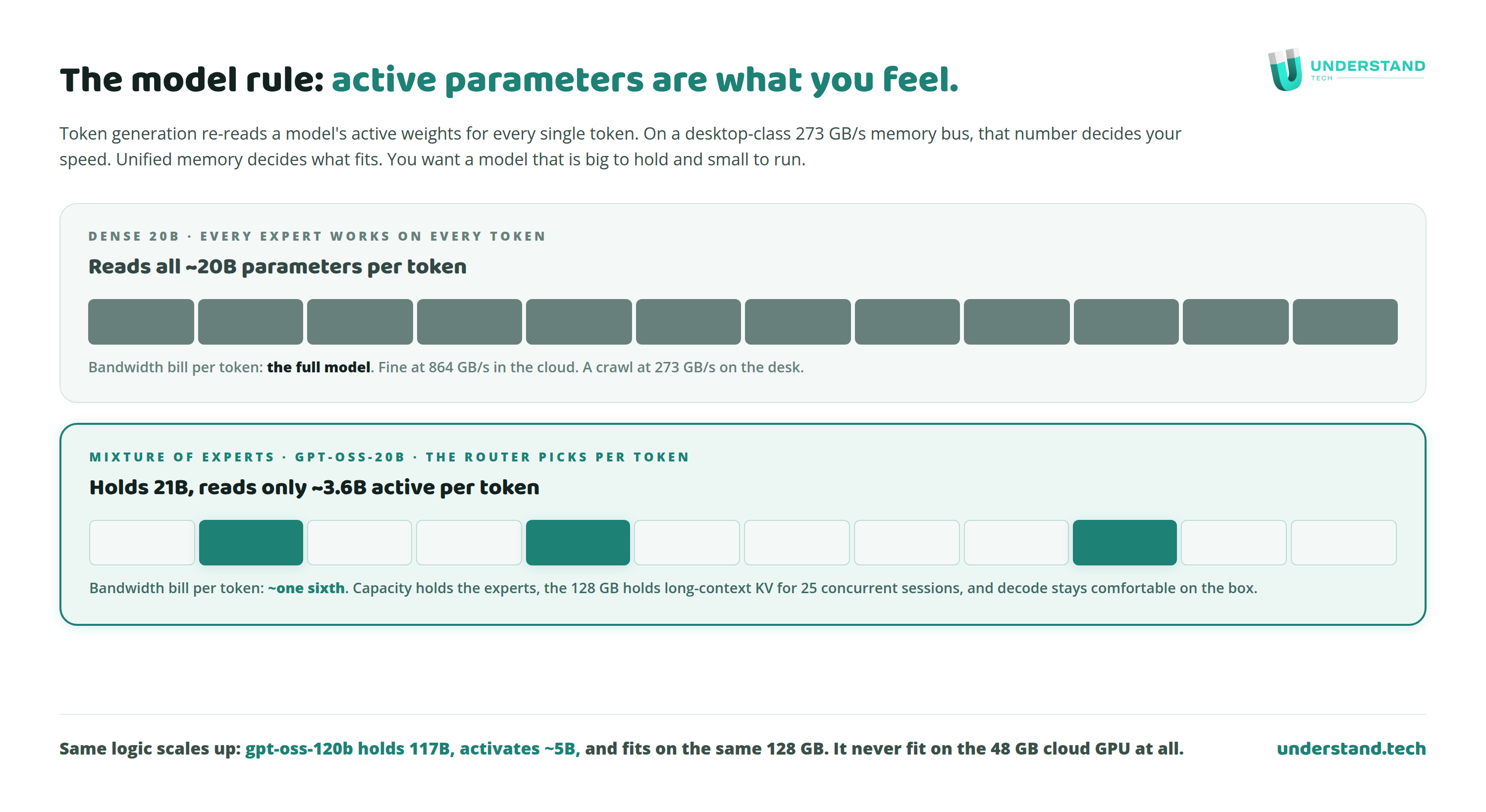
The Spark has 128 GB of unified memory and 273 GB/s of bandwidth. A cloud L40S has 48 GB at 864 GB/s. Those two numbers explain every skeptical comment about performance, and our model choices.
Token generation re-reads a model's active weights for every token. On 273 GB/s, active parameter count is what you feel. So we run mixture-of-experts models: gpt-oss-20b activates about 3.6B of its 21B per token. Nemotron 30B A3B activates about 3B of 30B. Big to hold, small to run. The 128 GB holds the experts, the vision model, the reranker, and the KV cache for 25 concurrent long-context sessions, things the 48 GB card could never hold at once. And gpt-oss-120b fits on the same box at 0.80 memory utilization. It never fit in the cloud instance at all.
Per-stream, the cloud GPU is faster. Per-fleet, at our concurrency, with our models, the box carries the workload with latency competitive with what we measured in-cloud once the tunnel is accounted for. Our use case is agents doing document extraction and structured output. Losing a couple of seconds on a response changes nothing. And for a multi-user platform, concurrency is the number that matters more than any single-stream benchmark: we load test to 25 concurrent users. The AWS setup held 25. The boxes hold almost the same. A full latency and throughput table is coming in a follow-up benchmark post.
Failover, the backhoe, and the risk we accepted
Asked many times, so plainly: two boxes, load balancing and failover handled by the ALB on the AWS side. If a box dies, the other takes over. If the office loses power or fibre, the SaaS itself does not blink, because the front door never left AWS. Inference is degraded until the office is back or until we re-register cloud capacity, which remains a target-group change.
We wrote down our availability target before migrating: minutes of downtime are acceptable for this workload. Not four nines. Four nines is a per-workload cost decision, and this workload never justified that spend, in the cloud or out of it. Our previous setup, two standalone EC2 instances, was not four nines either.
What we knowingly accepted: physical risk concentrated in one office, on-call is us, hardware replacement is on us. What we got for accepting it: about $80,000 a year that now pays humans instead of meters.
The security posture, since that is why our customers do this
Cost was our trigger. For our customers, security comes first, so here is ours plainly. The boxes have zero public exposure: the inference endpoint is reachable only from the VPC, through the IPsec tunnel, by the ALB. Nothing listens on the internet. The units sit on their own LAN segment behind the VPN router, storage is self-encrypting NVMe, and platform access is SSO only, OpenID Connect, no local passwords. Documents, models and the vector index live on hardware we can point at. And nothing changed on the AWS side: one account per environment, IAM managed as code behind pull requests, GuardDuty, KMS, Secrets Manager, exactly as before. We publish the pattern and the ciphers. We do not publish addresses, and neither should you.
The cost, line by line
Because a percentage is not a breakdown. Here is the actual ledger.
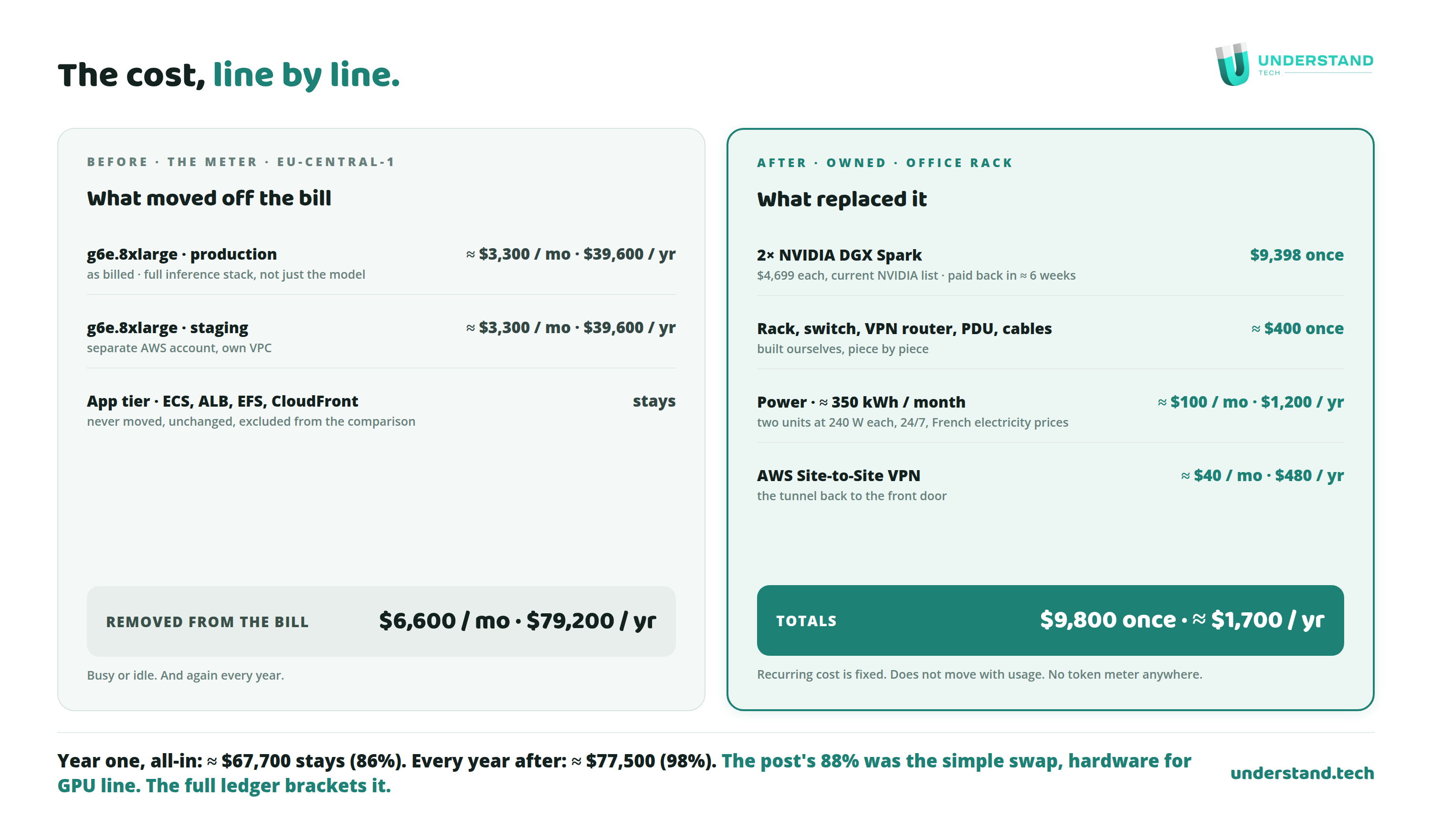
The short version in words. Removed: two g6e.8xlarge instances at roughly $3,300 each per month, as billed. $6,600 a month, $79,200 a year, again every year. Unchanged and excluded: the app tier on ECS, the ALB, EFS, CloudFront, because it never moved. Added, one time: two DGX Spark units at $4,699 each, current NVIDIA list, $9,398 for the pair, plus about $400 of rack, switch, VPN router and cables we assembled ourselves. Call it $9,800 of hardware, paid back in about six weeks. Recurring after that: about $100 a month of electricity for both units and about $40 for the site-to-site VPN. About $1,700 a year, fixed, regardless of usage.
So where does the 88% from the LinkedIn post sit in all this? It was the simple swap: the GPU bill against the box hardware alone, year one. Add every small cost, the rack, the power, the VPN, and year one lands at 86%. Let the hardware age twelve months and it becomes 98%. The full ledger does not contradict the headline, it brackets it: the true number starts two points below it and ends ten points above. The numbers get better with time, not worse.
The best objection came from a CTO
One commenter pointed out we could have rightsized: smaller instances carry the same L40S, and a 3-year reserved commitment would have cut the bill about 85% without leaving AWS. Solid math, and worth answering seriously.
Two problems. First, a three-year GPU commitment in 2026 is a bet that neither the models nor the hardware move for three years. Everything in this post contradicts that: we changed serving engine and models twice in two months, by choice, because better options shipped. Second, even the rightsized on-demand setup loses to the boxes within months, and every replica you add in the cloud multiplies a monthly meter forever. On the rack, a replica is one more box, paid once. Overprovisioning what you own is called headroom.
What the 88% measures, exactly
One commenter challenged the measurement, and the challenge is fair. The line items are above. The 88% is the simple version: the avoided GPU bill against the box hardware alone, first year, same workload, same pipeline, same users at acceptable latency. The full ledger above brackets it, 86% all-in in year one, 98% every year after. It is not a full unit-economics study with depreciation schedules and allocated facility costs. Although if you want one: assume we throw both boxes away every three years. Amortized, that is about $272 a month, $412 all-in with power and VPN, against $6,600. Still roughly 94% cheaper with full hardware replacement priced in.
Our facility cost is a wall socket: the two boxes draw 240 W each, about 350 kWh a month combined, and the VPN is tens of dollars. If you want to run the numbers with your own assumptions, that is exactly what the calculator is for. Every formula is visible.
If you are going to copy this
Five checks, in order. Your inference load is steady and 24/7, that is the profile where meters lose. Your app already reaches inference through one internal entry point, if not, build that first. Know your ISP constraints before buying hardware. Pick models that are big to hold and small to run. And test side by side before cutover, with the rollback path warm, until switching feels boring.
Ours felt boring after two months. Then we terminated the instances.
Several people asked if we would build this for other companies. That is literally what we sell: the same stack, as an appliance, called AI in a Box. But you do not need us to copy the recipe. It is all above, the documentation is open, and the repository is on GitHub.
Stack: 2× NVIDIA DGX Spark (GB10, $4,699 each at NVIDIA list) · NVIDIA NIM 2.x (vLLM engine) · Nemotron 3.5 Lightning 30B A3B, Qwen3.8 27B, Qwen3 VL 4B · LangChain 1.3.12 / LangGraph 1.2.8 · Nomic Embed v1.5, Qwen3-Reranker 0.6B, BM25 + FAISS · Docker Compose + Portainer · AWS ALB with IP targets + Site-to-Site VPN. Previously on AWS: 2× g6e.8xlarge, vLLM 0.11.1, gpt-oss-20b. Product: understand.tech/product/ai-in-a-box · Docs: docs.understand.tech/documentation/ai-in-a-box · GitHub: github.com/understand-tech/ai-in-a-box