Chat with CSV
Ask your spreadsheets and documents anything, in plain language, and get exact answers with charts, KPIs and citations.
Drop a CSV, Excel workbook, PDF or Word doc into your branded portal and start a conversation. No formulas, no SQL, no dashboards to build, your team gets accurate, source-cited answers in seconds.
Built for teams whose answers live in spreadsheets, not dashboards.
Ask Your Data
3 files connected · Ready
What was Q3 revenue per region?
EMEA $4.2M, Americas $3.8M, APAC $1.6M. Total $9.6M, +18% vs Q2.
Source: revenue_2025.xlsx · sheet "Q3"
Classical AI-powered assistants struggle to truly understand your CSV.
They are limited when it comes to summarizing or really understanding the information inside a spreadsheet. That is exactly why this application was built. You can now ask any kind of question and the assistant will understand.
Approximate answers
Classical assistants miss the real meaning of rows and columns and reply with rough estimates instead of facts.
Wrong totals and summaries
When a number is not explicitly written in the file, the answer is invented rather than computed.
No real reasoning
Questions that require reasoning across many lines fall back to text search instead of real computation.
An assistant that truly understands your spreadsheets.
Drop your CSV, Excel or document into a branded portal and ask any question in plain language. The assistant reasons across lines, computes the real numbers and returns exact answers with charts, KPIs and source citations.
One platform, two experiences.
Switch between the administrator branding workspace and the end-user chat experience.
Brand, configure and deploy
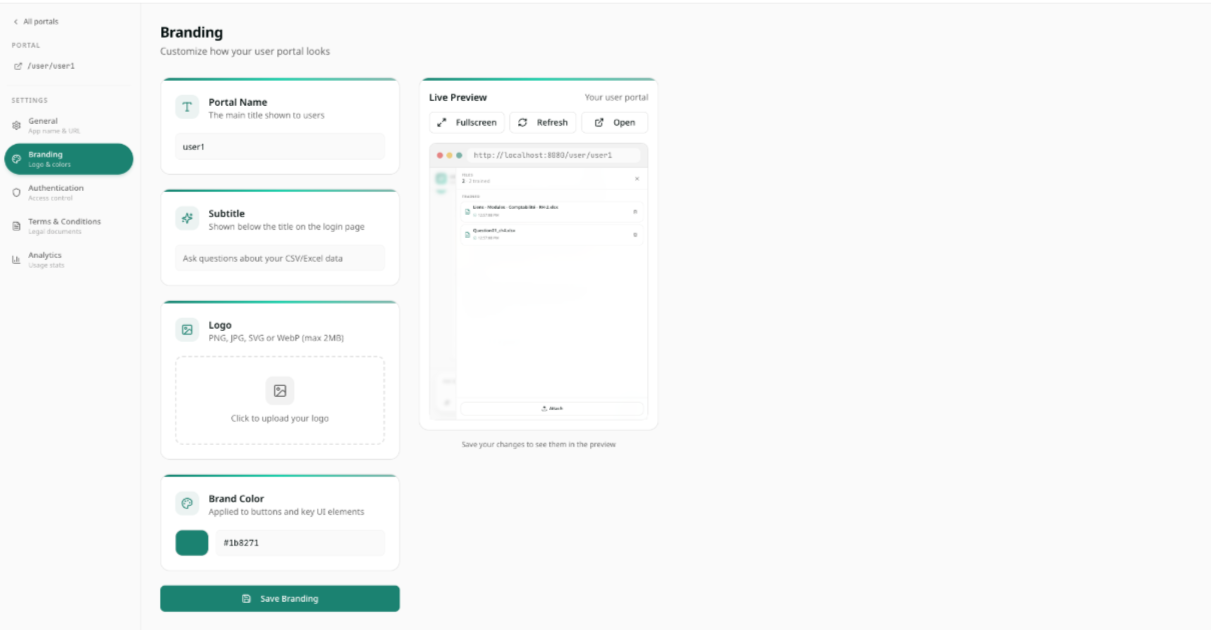
Configure each portal: name, subtitle, logo, brand color, authentication and terms.
Pixel-for-pixel white label, multi-portal admin, ship a branded "Ask Your Data" experience in hours.
Everything your team needs to chat with data.
Plain-Language questions
Aggregations, filters, ranks, joins across files, all from a chat box.
Spreadsheets and documents
Numbers go through SQL, text through retrieval, mixed answers merged automatically.
Exact answers
Computed against your actual data. Totals, counts and averages always match.
Industrial-grade ingestion
Merged cells, multi-section sheets, EU formats, transposed tables, hidden rows.
Branded portals
Your logo, colors, copy, auth and domain slug. Pixel-for-pixel white label.
Six things you can ask Chat with CSV
Summarize what your CSV is really about
Ask 'what is this file telling me?' and get a clear, sourced summary of the rows, columns and key signals, even on files with thousands of lines.
Get the right total, even when it is not in the file
Sum, average or count across hundreds of rows on the fly. The assistant computes the real number instead of guessing from a missing total line.
Answer questions about specific rows
Ask 'how many orders above 10k in EMEA last quarter?' or 'which customers churned in March?' and get the exact filtered answer with the underlying rows.
Compare segments, periods or files
Compare 2024 vs 2025, region vs region, or one CSV against another. The assistant reasons across the data and highlights the real differences.
Understand why a number looks off
Ask 'why did revenue drop in week 12?' and the assistant points to the rows, products or customers driving the change, with citations.
Cross-reference CSVs with PDFs and Word docs
Ask one question across a spreadsheet and a contract or report. The assistant joins both sources and answers from the real data, not approximations.
Built for teams that can't afford a leak.
Per-tenant isolation
One database schema per assistant. Two users can never see each other's data.
Read-only by design
Only SELECT and WITH queries are allowed. DROP, DELETE and ALTER are rejected upstream.
Cross-tenant SQL guard
Every generated query is validated against the tenant schema before it reaches the database.
Production-ready data layer
Postgres on AWS RDS, Multi-AZ, Secrets Manager, S3 storage, structured logs and health checks.
No LLM credentials in the data layer
The component touching your data holds zero LLM keys. LLM work is brokered separately.
Branded auth, your rules
Public, password, magic link or SSO per portal, with email allowlists and TOS acceptance.